
# Your First REST API
# What is an API?
應用程式介面(API, Application Programming Interface)是軟體系統中不同組成部分之間銜接的約定。以網路應用程式來說,網際網路串接起數以萬計的端系統,這些端系統彼此之間就可以透過 API 接口進行溝通,接收一些請求資料並進行處理(可能需要連接資料庫數據進行檢索),然後將處理後的資料進行返回。
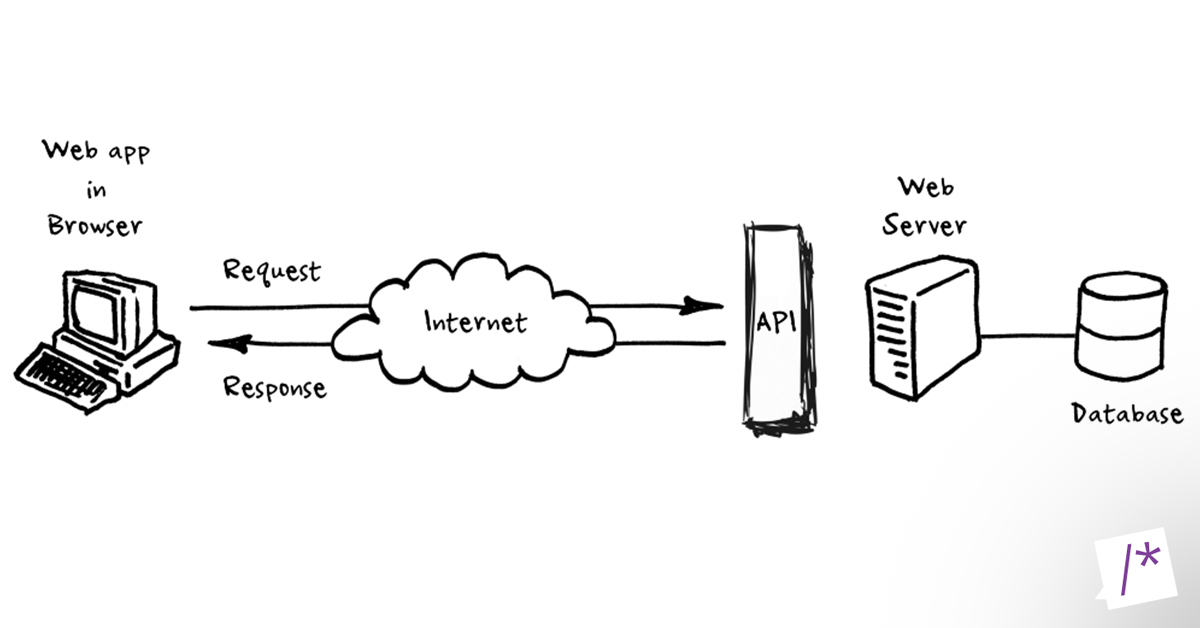
這一門課程將介紹如何使用 Flask 框架創建 RESTful API,如果想要更進一步了解如何與 API 進行交互,可以參考 How to interact with APIs using Python 這篇文章。
# HTTP Verbs
計算機網路在應用層提供了許多協議,其中超文本傳輸協議(HTTP, HyperText Transfer Protocol)提供了發布和接收 HTML 頁面的方法,透過 HTTP 或 HTTPS 協定請求的資源由統一資源識別碼(URI, Uniform Resource Identifiers)來標識。
客戶端的瀏覽器會向服務器端的主機發送請求,比如當我們訪問 http://developer.mozilla.org/ 時的請求如下:

其中 GET 就是 HTTP 協議中所定義的請求方法(Request Methods),一般又稱為 HTTP 動詞(HTTP Verbs)。每個方法都有不同的語意,透過這些方法來對給定資源執行特定的操作,目前常用的 HTTP 請求方法如下:
GET方法請求展示指定資源,使用 GET 的請求只應用於取得資料。POST方法用於提交指定資源的實體,通常會改變伺服器的狀態。PUT方法會取代指定資源所酬載請求(request payload)的所有表現。DELETE方法會刪除指定資源。
關於其他的 HTTP 請求方法,可以參考 HTTP request methods 所列出的說明。
# RESTful Principles
表現層狀態轉換(REST, Representational State Transfer)是 Roy Thomas Fielding 所提出來的一種軟體架構風格,他的設計理念如下:
- 將網路上的資訊看作資源,每一個資源對應一個特定的 URI,使用網路應用程式就是調用這些資源的 URI 進行存取
- 資源呈現的形式,應該在 HTTP 請求的 Header 中使用
Accepct和Content-Type字段指定 - 使用 HTTP 協議中的
GET、POST、PUT、DELETE請求方法對應四種基本操作
除了上述理念之外,在設計 RESTful API 還有一個重點,就是要儘量地基於無狀態(stateless)的概念,也就是說請求之間彼此獨立,不應該存在依賴的關係。舉例來說:
- 使用
POST請求方法訪問/item/chair資源之後,會在資料庫中創建一筆資料,但對於伺服器來說並不知道這筆資料的存在,因此當使用GET請求方法再次訪問/item/chair資源時,仍然必須要溝通資料庫確認資料的存在性。- 使用者的登入狀態,並不會被儲存在伺服器中,因此每次發送請求時需要夾帶足夠的資料進行驗證。
# Create Application Endpoints
接著來實現一個簡單的商店應用:
from flask import Flask, jsonify, request, render_template

app = Flask(__name__)

stores = [{
    'name': 'My Store',
    'items': [{'name': 'my item', 'price': 15.99}]
}]


@app.route('/')
def home():
    return render_template('index.html')

# POST  /store data: {name :}
@app.route('/store', methods=['POST'])
def create_store():
    request_data = request.get_json()
    new_store = {
        'name': request_data['name'],
        'items': []
    }
    stores.append(new_store)
    return jsonify(new_store)

# GET   /store/<name> data: {name :}
@app.route('/store/<string:name>')
def get_store(name):
    for store in stores:
        if store['name'] == name:
            return jsonify(store)
    return jsonify({'message': 'store not found'})

# GET   /store
@app.route('/store')
def get_stores():
    return jsonify({'stores': stores})

# POST  /store/<name> data: {name :}
@app.route('/store/<string:name>/item', methods=['POST'])
def create_item_in_store(name):
    request_data = request.get_json()
    for store in stores:
        if store['name'] == name:
            new_item = {
                'name': request_data['name'],
                'price': request_data['price']
            }
            store['items'].append(new_item)
            return jsonify(new_item)
    return jsonify({'message': 'store not found'})

# GET   /store/<name>/item data: {name :}
@app.route('/store/<string:name>/item')
def get_item_in_store(name):
    for store in stores:
        if store['name'] == name:
            return jsonify({'items': store['items']})
    return jsonify({'message': 'store not found'})


app.run(port=5000)
在 Flask 框架中,可以透過裝飾器 @app.route() 來創建路由(routing),如果需要參數需要被函數所使用到,需要使用 <> 運算符來表示。
# Calling the API from JavaScript
在 JavaScript 可以透過 XMLHttpRequest() 對 API 端口發送請求:
function httpGetAsync(theUrl, callback) {
  let xmlHttp = new XMLHttpRequest();
  xmlHttp.onreadystatechange = () => {
    if (xmlHttp.readyState === 4 && xmlHttp.status === 200) callback(xmlHttp.responseText);
  }
  xmlHttp.open("GET", theUrl, true);  // true for asynchronous
  xmlHttp.send(null);
}

httpGetAsync('http://localhost:5000/store', response => alert(response));